Measuring local search CTR starts with three platforms: Google Business Profile for engagement data, Google Search Console for organic click performance, and GA4 for post-click behavior. Together, they show exactly how users interact with your listing across every local search channel.
Most local businesses track rankings and ignore CTR completely. That is a costly mistake. CTR tells you whether your visibility is actually converting into calls, direction requests, and website visits. A listing appearing 10,000 times a month means nothing if nobody is clicking it.
This guide covers every metric, tool, and step you need to measure and improve your local search CTR accurately. Read on to stop guessing and start making decisions based on real data.
What Is Local Search CTR?
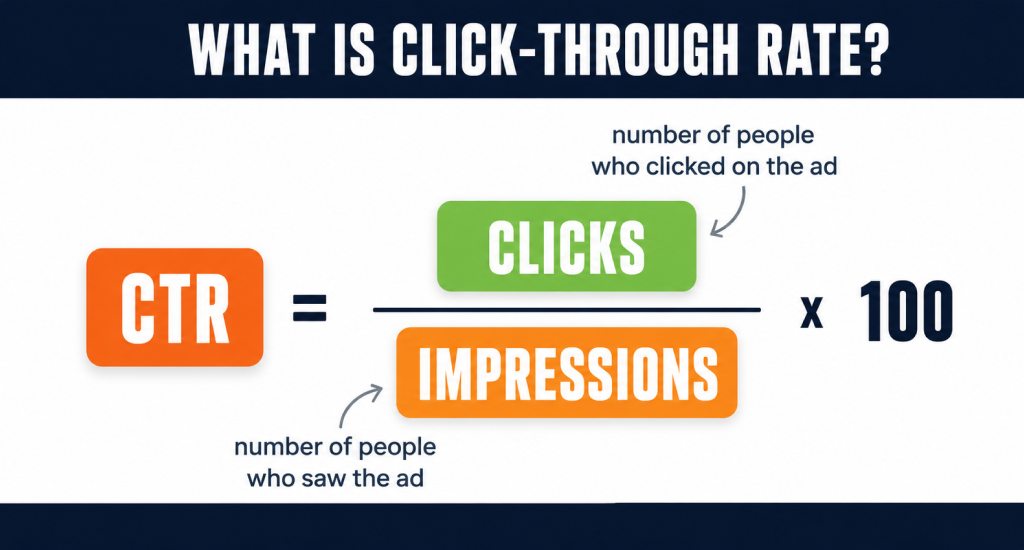
CTR means Click-Through Rate. The formula is simple: CTR = Clicks ÷ Impressions. If 100 people saw your listing and 10 clicked, your CTR is 10%. But in local search, “clicking” means more than visiting your website.
When your business shows up in the Google Map Pack, Google Maps, or your Google Business Profile, users can interact in several ways without ever touching your site. They can call you directly, ask for directions, or browse your profile photos and reviews. You can also find your Google review link and share it as well.
Why Local CTR Is Different From Regular CTR
Regular CTR only counts website clicks. Local CTR counts all meaningful engagement signals.
This distinction matters because a customer who taps “Call” or “Get Directions” is showing strong purchase intent. That action is worth more than a casual website visit from someone still browsing.
Local CTR measures both your visibility and your ability to convert that visibility into real interest. A high impression count with low engagement means something in your profile is not convincing enough to make people act.
Core Metrics Required to Measure Local CTR
To measure local search CTR properly, you need more than just clicks and impressions. Each metric tells a different part of the story, and ignoring any one of them gives you an incomplete picture of how your local listing is actually performing.
Primary Metrics: Clicks and Impressions
These two numbers form the foundation. Impressions tell you how many times your listing appeared in search results. Clicks tell you how many people responded. Divide clicks by impressions, and you have your CTR. Simple, but not the whole story.
Local Engagement Metrics That Actually Matter
Google Business Profile breaks engagement into three distinct actions. Each one signals a different type of user intent.
- Call clicks mean the user is ready to talk. This is your highest-intent signal and often the closest thing to a conversion you will see in local search.
- Direction requests mean someone is planning a physical visit. This is a strong offline conversion signal that most businesses completely overlook.
- Website visits mean the user wants more information first. This reflects research intent, not immediate action.
Supporting Metrics to Complete the Picture
These three metrics add important context to your CTR data.
- Conversion rate tells you what happens after the click or engagement.
- Local rankings show whether you are appearing in the Map Pack top 3, which directly impacts how often people see and click your listing.
- Share of Local Voice (SoLV) measures how often your business dominates local results compared to competitors.
How to Measure Local Search CTR (Step-by-Step Process)
Measuring local search CTR requires data from three separate platforms. Each one covers a different part of your local visibility, and you need all three working together to get accurate numbers.
Step 1: Measure Google Business Profile Engagement
This is where your local engagement data lives. Open your Google Business Profile dashboard and go to the Performance section. Set your date range to the last 3 months for a reliable trend view.
Track these four numbers every month:
- Website clicks from your GBP listing
- Call clicks made directly from the profile
- Direction requests from Maps users
- Total actions divided by total impressions for your engagement rate
This engagement rate works just like CTR. It shows what percentage of people who saw your profile actually did something with it.
Step 2: Measure Local Organic CTR Using Google Search Console
GSC shows how your local landing pages perform in organic search. Go to Performance, then add a query filter to isolate local intent searches.
Look specifically for city-based keywords like “dentist in Austin” and “near me” queries. For each filtered result, note your clicks, impressions, and CTR percentage. Any local keyword sitting below 5% CTR with decent impressions is an immediate optimization opportunity.
Step 3: Analyze Traffic Behavior Using GA4
GA4 tells you what happens after someone clicks. Go to Traffic Acquisition and filter by source.
Focus on these two sources separately:
- Google / organic for local landing page traffic
- Google / Maps for direct GBP-driven visits
Then check sessions, engagement rate, and conversions for each source. Low engagement from Maps traffic often means your profile is attracting the wrong audience or your landing page does not match what the listing promised.
Common Mistakes When Measuring Local CTR
Most businesses measure local CTR wrong from the start. These mistakes make your data look fine on the surface while hiding the real problems underneath. So, while learning how to measure local search ctr, you must learn the common mistakes to avoid:
Tracking Only Website Clicks
Website clicks are just one piece of local engagement. Calls and direction requests often drive more revenue, and leaving them out makes your CTR look artificially low.
Ignoring Calls and Direction Requests
These two actions signal the strongest purchase intent in local search. A business with 50 call clicks and 30 direction requests is performing well, even if website clicks look disappointing.
Using Short Time Ranges
One or two weeks of data is too noisy to trust. Local search behavior shifts with seasons, holidays, and algorithm updates. Always use a minimum of 90 days for any meaningful CTR analysis.
Not Filtering Local Keywords
Mixing national and local keyword data together pollutes your CTR numbers completely. Always filter by city-based terms and “near me” queries inside GSC before drawing any conclusions about local performance.
Ignoring SERP Features and Position
A listing in position 6 will never match the CTR of a Map Pack result. Your CTR data only makes sense when you factor in where your business is actually appearing on the page.
Confusing CTR With Conversion Success
High CTR means people clicked. It does not mean they bought, called, or visited. Always pair your CTR data with conversion metrics to understand whether that traffic is actually worth anything.
Best Tools to Measure Local Search CTR
The right tools make the difference between guessing and knowing. These platforms cover every layer of local CTR measurement, from raw impression data to call tracking and grid-based visibility analysis.
Primary Tools for Local CTR Measurement
These are the three free platforms every local business should set up before spending money on anything else. They cover the core data you need to measure impressions, clicks, and on-site behavior accurately.
Google Business Profile (GBP)
GBP Performance gives you direct engagement data, including call clicks, direction requests, and website visits. It is the only place where you can see how users interact with your listing before reaching your site.
Google Search Console (GSC)
GSC shows your local organic CTR at the keyword level. You can filter by city-based queries and near me searches to isolate exactly how your local landing pages are performing in search results.
Google Analytics 4 (GA4)
GA4 tracks what happens after the click. It separates google/organic and google/maps traffic so you can measure session quality, engagement rate, and conversions coming specifically from local search sources.
Supporting Tools for Deeper Local Insights
Once your free data sources are set up, these tools help you go deeper. They fill the gaps that Google’s native platforms leave open, especially around competitor benchmarking and call attribution.
BrightLocal
BrightLocal tracks local rankings, monitors GBP performance, and benchmarks your visibility against nearby competitors. It is particularly strong for agencies managing multiple local business locations at once.
Whitespark
Whitespark specializes in local rank tracking and citation building. It helps you connect your local search visibility directly to the keywords driving impressions and CTR in your target city.
Localo
Localo focuses specifically on Google Business Profile optimization and performance tracking. It gives you actionable scores and recommendations based on how your GBP listing compares to local competitors.
CallRail
CallRail tracks phone calls back to their source, including Google Search and GBP listings. It closes the gap between call click data in GBP and actual connected calls with real attribution detail.
DashClicks
DashClicks is a reporting and fulfillment platform that pulls local SEO data into one dashboard. It is useful when you need to present local CTR and engagement metrics clearly to clients or stakeholders.
Advanced Tools for Precision Tracking
These tools are built for businesses and agencies that need granular local visibility data. They go beyond standard reporting and show exactly where your listing stands across a geographic area.
AccuRanker
AccuRanker delivers fast, accurate rank tracking with local SERP data down to the zip code level. It helps you understand how your position changes affect CTR across different neighborhoods or service areas.
Local Falcon
Local Falcon uses grid-based tracking to show your Map Pack visibility across a geographic area. Each point on the grid shows your ranking position, making it easy to spot where your local CTR is being lost to competitors.
How to Measure CTR Across Different Local Search Channels
Local search is not a single channel. Your business can appear in five different places on the same results page, and each one has its own CTR pattern, measurement method, and engagement behavior.
Why Each Channel Has a Different CTR
No two local search channels perform the same way. A Map Pack listing gets clicked differently than an organic result, and a Local Services Ad attracts a completely different type of user. Understanding each channel separately stops you from averaging out data that should never be combined.
Map Pack CTR (Local Pack / 3-Pack)
The Map Pack sits above organic results and captures the highest share of local clicks. Measure it through GBP Performance using impressions and total actions. Businesses in position 1 of the 3-Pack consistently see significantly higher engagement than positions 2 and 3 combined.
Google Maps CTR
Google Maps generates its own traffic stream separate from the standard SERP. Track it in GA4 under the google/maps source. Users arriving from Maps have stronger offline intent, meaning direction requests and call clicks are your most relevant CTR signals here.
Organic Search Listings
Organic positions directly below the Map Pack still attract meaningful clicks, especially for informational local queries. Measure these in GSC by filtering city-based keywords and tracking CTR at the position level. Position 1 organic typically pulls between 25% and 35% CTR for strong local terms.
Google Ads CTR
Paid search CTR lives inside Google Ads under the Campaigns tab. Filter by location targeting to isolate local campaign performance. Local paid CTR benchmarks run between 4% and 6% for most service-based businesses, though competitive niches often see lower numbers.
Google Local Services Ads (LSA)
LSAs appear above everything else on the page, including standard paid ads. CTR data lives inside the Local Services Ads dashboard under lead and impression reporting.
Because these ads show your reviews and Google Guaranteed badge, they typically convert at a higher rate than standard text ads.
How Multi-Channel Presence Multiplies Your Total CTR
Owning more than one position on the same results page increases your total share of clicks significantly. A business appearing in the LSA section, the Map Pack, and the organic results simultaneously can capture clicks from users at every stage of their decision process.
This combined presence is called multi-channel visibility, and it is one of the most reliable ways to grow your total local engagement rate without improving any single listing in isolation.
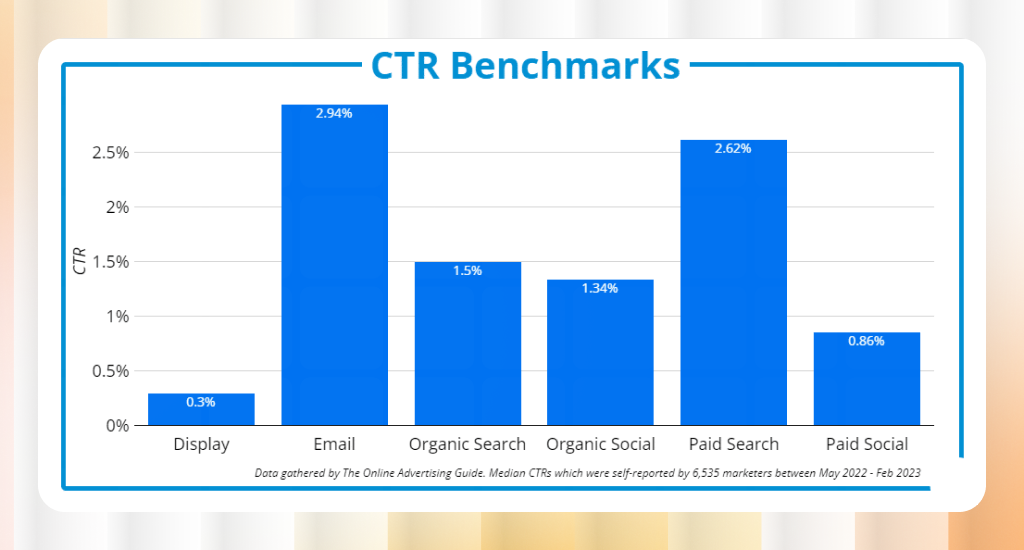
What Is a Good Local Search CTR Benchmark
There is no single CTR number that works as a universal target for local search. What counts as a strong CTR in one market can signal a serious problem in another, depending on how competitive your area and industry actually are.
Why Benchmarks Vary by Industry and Location
A dental clinic in a small town faces completely different competition than one in a major city. Industry, search intent, and local competition all shift your expected CTR range. Comparing your numbers against a generic benchmark will almost always lead you in the wrong direction.
How to Set Your Own CTR Baseline
The most reliable benchmark is your own historical data. Track your CTR month over month inside GSC and GBP Performance. Consistent growth over 90-day periods matters far more than hitting an arbitrary industry average that may not reflect your market at all.
The CTR Curve and Why Position Dominates Everything
Higher rankings produce dramatically higher CTR. Position 1 in local organic search typically pulls 25% to 35% CTR. Position 3 drops to roughly 10%. Map Pack position 1 consistently outperforms all organic positions below it. This curve means that even a one-position ranking improvement can meaningfully increase your total clicks.
High CTR Without Conversions Is a Warning Sign
Strong CTR with weak conversion numbers means your listing is attracting the wrong audience. Always measure CTR alongside calls, bookings, and form submissions to confirm that clicks are turning into real business outcomes.
Why Local CTR Works Differently Than Organic CTR
Local CTR follows completely different rules than standard organic CTR. The user, the intent, and the search environment are all different, which means the same click data tells an entirely different story in a local context.
Map Pack Bias and User Intent
When someone searches “plumber near me,” they are not browsing. They want a name, a number, and a solution fast. The top 3 Map Pack listings absorb most clicks before anyone scrolls to organic results. This concentration effect simply does not exist in standard organic search.
Local results pages are also crowded. Ads, Knowledge Panels, and the Map Pack all compete for the same attention. Each feature appearing above your organic listing reduces your CTR regardless of your ranking position. Mobile users make this worse by calling or requesting directions without visiting your site at all.
Branded searches add another layer of distortion. Always filter branded and non-branded keywords separately in GSC; otherwise, your CTR average will look far stronger than your actual non-branded local performance.
Standard CTR Formula vs Local CTR Formula
The basic formula is CTR = (Clicks / Impressions) x 100. Clicks are how many times someone selected your result. Impressions are how many times your listing appeared on a search results page. This works fine for broad organic performance tracking.
In local to national SEO, this formula misses too much. It ignores calls, direction requests, and profile interactions that drive most local revenue. A customer who calls directly from your GBP listing never registers as a click in GSC at all.
The more accurate measure is Local Engagement Rate = (Website Clicks + Calls + Direction Requests) / Total Views. This captures every meaningful action on your listing and connects your data to real business outcomes like calls, visits, and bookings.
How to Improve Local Search CTR Effectively
Improving local CTR means making your listing more compelling at every touchpoint. Small changes across your profile, search appearance, and keyword targeting add up to significantly more clicks and calls.
- Photos: Fresh, high-quality photos on your GBP listing increase profile views and engagement rate measurably compared to listings with outdated or missing images.
- Reviews: A higher review count with strong ratings makes your Map Pack listing stand out visually and builds enough trust to push hesitant users toward clicking your profile. It usually works better unless your Google review is not showing publicly.
- Categories: Choosing the most accurate primary and secondary categories ensures your listing appears for the right search queries and attracts users with genuine purchase intent.
- Title Tag: Your local page title should include your primary keyword and city name naturally. A clear, specific title consistently outperforms vague or generic ones in local search CTR.
- Meta Description: Write your meta description as a direct answer to what the user is searching for. Include a clear action signal like “call today” or “serving Austin since 2010.”
- Structured Data (Schema): Adding local business schema helps Google display rich results including ratings, hours, and address directly in the SERP, making your listing more clickable without any ranking improvement.
- Local Keywords: Target keywords that include your city, neighborhood, or service area. These terms attract users with immediate local intent rather than broad informational searchers.
- Long-Tail Keywords: Longer, specific queries have lower competition and higher intent. A user searching “emergency roof repair in Dallas” is far closer to converting than someone searching “roofing.”
- “Near Me” Queries: Optimize your GBP and on-page content to capture near me searches. These queries have some of the highest CTR and conversion rates in all of local search.
- Improve Ranking Position: Moving up even one position in the Map Pack or organic results can double your CTR based on how the local click curve actually distributes traffic.
- Increase SERP Visibility: Appearing in the Map Pack, organic results, and ads simultaneously gives you multiple chances to capture the same user. Combined presence consistently produces a higher total engagement rate.
- Pro Insight: Local CTR is a conversion intent signal, not just a traffic metric. If your CTR is high but conversions are low, your listing is attracting the wrong audience entirely. Fix your targeting before chasing more clicks.
Final Thought
Knowing how to measure local search CTR gives you a clear picture of what your local visibility is actually worth. Tracking GBP engagement, GSC performance, and GA4 behavior together turns raw data into decisions that drive real business growth.
Start with optimizing your Google Business Profile today. Set your 90-day baseline, filter your local keywords in GSC, and check where your engagement is leaking. Small fixes compound quickly in local search.