Local customers search on Google Maps before calling or visiting a business. If your profile looks weak or empty, they skip you fast. This weak condition makes your Google Business Profile very important today.
A strong profile boosts your local SEO and helps your business appear higher on Google Maps. It also brings phone calls, direction requests, and genuine leads. This strong appearance works best for local service businesses, and it costs nothing.
This Google Business Profile Optimization Guide shows clear steps you can follow with ease. It explains setup, profile updates, posts, reviews, tracking, and a simple checklist. You can finish most steps in under one hour.
How Google Business Profile Rankings Work (Relevance, Distance, Prominence)
Rankings come from relevance, distance, and prominence, not just by keyword tricks. Google uses these three factors to decide which businesses appear in the Local Pack, also called the Map Pack. This priority rule applies to local SEO and Google Maps ranking for all companies. Knowing the top 3 map pack traffic percentage helps you understand why ranking here often drives the most local leads.
Relevance
Relevance shows how closely your profile matches what a person searches. Google checks your business category, listed services, and text in your profile. If someone searches for a plumber, Google looks for profiles marked as plumbing services.
You can control relevance. Try to use the correct primary and secondary categories. Add clear service names. Write simple descriptions that match real services. This type of careful and relevant input is a major part of how to optimize Google Business Profile for fast results.
Distance
Distance means how close the searcher is to your business location. Google uses the user’s phone or search area to measure this. A nearby business often appears first in Google Maps results.
You cannot control distance. You cannot change where a user stands. You can only ensure your address is correct and visible inside your profile.
Prominence
Prominence shows how well-known and trusted your business looks online. Google checks website health, reviews, review replies, mentions on other sites, and business listings. These listings are called citations.
You can control prominence. Design and develop your website for users and make it safe & speedy. Ask customers for reviews. You can also reply to each review. You should keep the business name, address, and phone number the same across all online platforms.
Google Search shows many website pages. Google Maps focuses on nearby businesses. That nearby prominence is why profile quality matters more inside Maps.
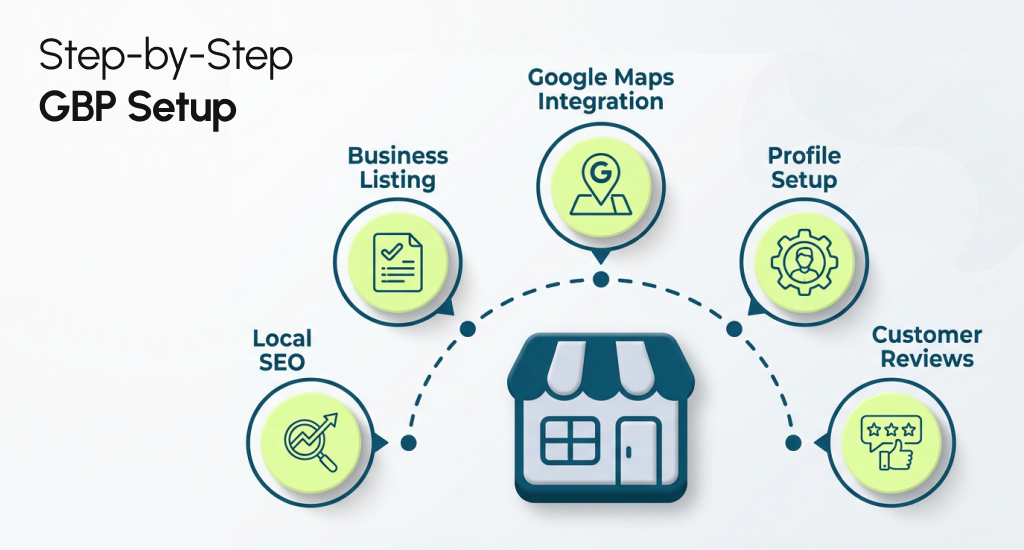
Step-by-Step Google Business Profile Setup & Verification (The Foundation)
A correct setup builds the base for Google Maps growth. If this step goes wrong, later work brings weak results. This section explains how to optimize Google Business Profile from day one and how to claim a business listing the right way.
Step 1: Claim your business listing
Go to Google and search your business name. If a profile appears, claim it. If no profile appears, you should create one. Google now uses NMX, which means profile control stays inside Google Search and Google Maps. It is not done in a separate app.
After the claim, you should enter the business dashboard, where all edits take place.
Step 2: Enter core business details
You should add your business name, address, and phone number. This data must match real records. Add your main category first. Categories tell Google what your business offers.
Remember to add service areas if you visit customers. Also, try to add business hours that match real open times.
Step 3: Choose a verification method
Google must confirm your business is real. This process is called verification. Common verification methods include a postcard, phone, email, or video proof. Google selects the required method.
You should follow the exact steps shown in your dashboard. Do not edit important details during this time.
Step 4: Complete profile after approval
After verification, you can unlock full access inside the business dashboard. You should add services, photos, and a short description. These details support local SEO and Google Maps ranking.
This base details helps Google trust your profile and show it to nearby users. A strong setup makes every future update more effective and smooth.
Optimize Core Business Info (The Biggest Ranking Levers)
Most ranking drops come from incorrect categories, incomplete info, or inconsistent NAP. Core business details build trust signals for Google. Strong accuracy supports local SEO Google Maps ranking and helps improve Google Business Profile visibility.
Business Name (Avoid Keyword Stuffing)
You should use the real business name shown on signs, bills, and legal records. Google has strict business name guidelines. Extra words increase the risk of suspension and public edits. This information input mistake often causes ranking loss and profile removal.
If your profile shows unwanted edits, learn how to fix Google Business Profile editorial summaries before they affect visibility.
Categories & Subcategories (Primary Category Wins)
Your primary category carries the most weight. Try to pick the category that best matches your main service. You can add secondary categories only if they fit real services. Service lists must align with categories for clear relevance signals.
Address vs Service Area Business (SAB)
If customers visit your location, you should show the address. If you visit customers, hide it and use service area settings. Try to set a realistic coverage radius. Large areas of lower trust and hurt service area optimization results.
Hours + Special Hours
Correct hours build trust with Google and users. You should add daily hours and holiday hours in advance. Wrong hours cause poor visits and bad reviews. Accuracy here helps how to optimize the Google Business Profile for visibility.
Attributes (Small Details, Big Impact)
Attributes show features like wheelchair access or on-site service. These details help search matching and user trust. You should select only true options. False attributes can cause user reports and reduce the improvement of Google Business Profile visibility over time.
Each section mentioned above acts as a ranking lever. Small errors in core info often block growth on Google Maps.
Write a High-Converting GBP Description
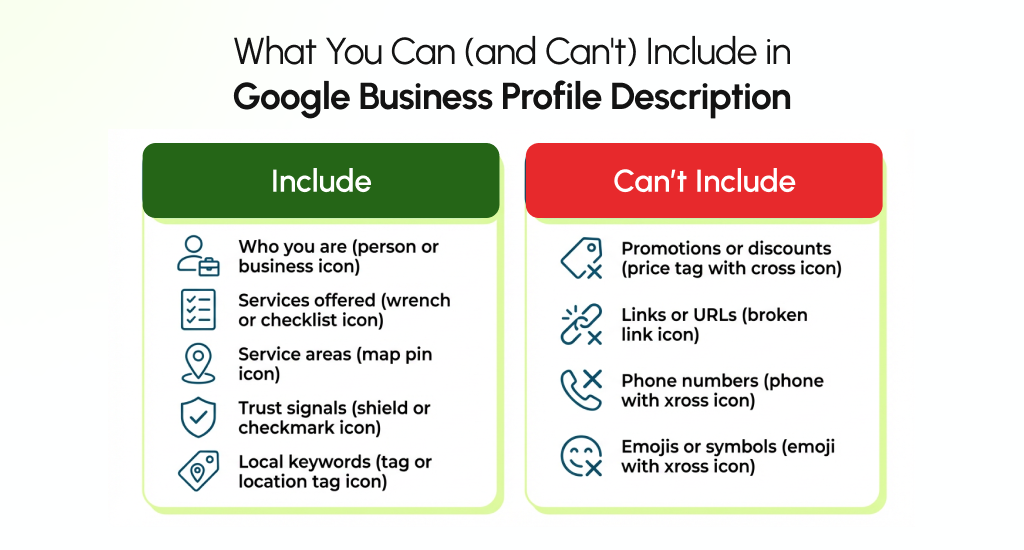
The best descriptions explain what you do, where you serve, and why people trust you. All that just by using natural local phrases. This clear explanation helps business description optimization. Also, it helps to improve Google Business Profile visibility.
Things to keep in mind while you write your GBP description:
- Start with who you are and what service you offer. You should use clear words that real customers use in searches.
- Add your main service area and nearby locations so Google connects your profile to local search intent.
- List core services in plain language so users and Google both understand your business focus.
- You should add trust signals like years of service, licenses, or customer praise without sales words or discounts.
- Stay within the 750-character limit and try to avoid links, phone numbers, emojis, or promotional phrases.
Example 1: Local Plumber (Within 750 Characters)
We are a local plumbing company serving homeowners and small businesses across East Hanover and nearby areas. Our team handles leak repair, pipe replacement, water heater service, drain issues, and fixture installation. Each job follows local safety rules and proven repair methods. Customers trust us for clear pricing, clean work areas, and honest service advice. We arrive on time, explain the issue in simple words, and complete work with care. Many local residents choose us again because of consistent service quality, strong reviews, and reliable support for both urgent and planned plumbing needs.
Example 2: Local Landscaper (Within 750 Characters)
We provide professional landscaping services for homes and commercial properties in and around East Hanover. Our work includes lawn care, seasonal cleanup, planting, mulch work, trimming, and yard design support. Every service follows a clear plan based on property size and local soil conditions. Clients value our steady schedules, respectful crews, and attention to detail. We help property owners maintain healthy outdoor spaces through every season. Local reviews reflect trust, repeat service use, and long-term care results across many neighborhood properties.
Services, Products, and Attributes Optimization For GBP Profile (Relevance Boosters)
Google understands your business better when services and products are listed clearly. This clarity improves the match with specific searches and supports local SEO Google Maps ranking for nearby users.
Services Section (Strong Relevance Signal)
You should add services that match your primary and secondary categories. Each service should reflect the real work you offer daily. This category helps Google connect your profile to the right search terms.
Write short service details. You should use simple words. Try to add local place names in a natural way, like a city or a neighborhood. This narrowing down supports the services section optimization without spam risk.
Product Section (Useful for Select Businesses)
Don’t forget to use the product section if you sell fixed items or clear packages. Each product should include a name, a short description, and an optional price.
Service businesses can list packages here, like inspection plans or maintenance options. This package system adds clarity and helps local SEO Google Maps ranking for service-based searches.
Attributes (Trust and Match Boosters)
Attributes show major features of your business. Common examples include on-site service, appointment required, or wheelchair access. You should choose only true attributes. Wrong details cause user reports and profile edits. Correct attributes help your profile appear for filtered searches and improve local visibility.
Pricing (Optional but Helpful)
Price ranges help users decide faster. You should add price only when stable and honest. Try to avoid symbols or sales words. Clear pricing details support trust and reduce low-quality calls. Also, it will really improve search match accuracy.
Photos & Videos Optimization for Google Maps (Prominence + CTR)
Businesses with frequent real photos outperform stock-image profiles in Maps visibility and clicks. Visual proof really builds trust fast and supports photo optimization for stronger Google Maps results.
Photo Types That Matter Most
You should upload a clear logo so people recognize your brand. Add a cover image that shows your service in action. Try to share team photos to show the real staff. You can post work photos to prove skills. Also, try to add exterior photos so visitors spot your location with ease.
Quality Rules That Improve Trust
Always use bright, clear images without heavy filters. You should show real jobs, tools, and spaces. Avoid stock images or copied visuals. Real photos raise engagement and increase photo views. Also, it supports improving Maps’ presence over time.
If uploads fail, see why Google is rejecting your business photos and how to fix common photo policy issues.
File Names and Geotag Myth
File names do not affect Google Maps ranking. Geotag data also has no proven impact today. You should focus on photo quality and regular uploads. Google reads user actions, not the hidden file data.
Still, clean file naming helps site SEO, so follow this SEO recommended character size for image file names guide.
Short Video Ideas (15-30 Seconds)
You should record short clips of the team at work, before and after results, or simple service tips. Keep videos steady, clear, and natural. Keep in mind, vertical or horizontal both work fine.
Upload Cadence That Works
Try to add new photos each week. Even two to three uploads help. Steady updates show activity, raise engagement, and improve Maps’ presence without extra effort.
Reviews & Reputation Management (How to Get to 4.9★ Ethically)
Reviews drive prominence and conversions. A strong review profile boosts Google Maps ranking, while thoughtful responses protect your rating and build trust. Managing reviews correctly helps you maintain long-term credibility.
How to Generate Reviews Ethically
Generating customer reviews requires timing, method, and care. If you can ask the right way, it can ensure genuine feedback. These real reviews can support local SEO on Google Maps and help avoid Google penalties.
Who to Ask
You can request reviews from satisfied customers who recently used your services. Always focus on real experiences. You should avoid pressuring unhappy clients, as this may result in negative reviews or spam reports.
Best Timing and Channels
Try to ask soon after the service is completed, when the experience is fresh. You can use email, SMS, receipts, or QR codes at your location. Timing improves response rates and ensures authentic feedback.
Use this guide to get more Google reviews with simple follow-up methods that stay ethical and compliant.
What Not to Offer
You should never offer discounts, freebies, or incentives in exchange for reviews. Google flags this as spam. Genuine reviews must reflect honest opinions without rewards or manipulation to maintain credibility.
Easy Access Links
Try to provide direct links to your Google Business Profile review page. QR codes in-store or in emails make leaving a review simple. Convenience increases review velocity ethically.
Responding to Positive, Neutral, and Negative Reviews
Responding promptly improves trust and shows you care. Tone, clarity, and human touch matter more than keywords in your responses. Proper templates can help maintain consistency.
Positive Reviews
You should thank the customer sincerely. Try to highlight their service experience briefly. Keep responses short, friendly, and natural. You should mention the local area if it fits. It can reinforce trust and improve the sentiment.
Neutral Reviews
Try to acknowledge concerns respectfully. You should offer to clarify or assist without arguing. It is better to show that you value feedback and aim to improve. Neutral replies can convert mild dissatisfaction into loyal customers.
Negative Reviews
You must respond calmly and avoid defensive language. Apologize for the inconvenience, explain the next steps, and invite offline resolution. Professional responses can turn a negative into a trust signal for future customers.
Trust Signal Elements
Use real staff names, location mentions, and service references. Keep in mind, human tone beats keyword stuffing. Short, clear replies improve your organic SEO, Google Maps ranking, and profile credibility.
Handling Spam/Fake Reviews
Fake reviews can harm the reputation and mislead customers. Google has policies to remove these, but evidence and reporting are necessary. Correct review handling protects your rating and Google profile trust.
If your rating drops suddenly, learn why your Google business reviews are disappearing and what steps to fix it.
When Removal Is Possible
Google may remove reviews that violate its policies, such as spam, conflicts of interest, or fake accounts. You should only report reviews with clear evidence. Also, you should keep documentation of customer interactions.
How to Report or Flag
Inside your business dashboard, you can use the “Flag as inappropriate” option. Provide a concise reason and evidence. You should monitor flagged reviews regularly to maintain profile accuracy.
Escalation Path
If initial reports fail, you should contact Google Business Profile support via email, chat, or social media. Try to maintain records of reports and communications. Proper escalation can help ensure profile safety and review integrity.
Prevent Future Spam
You should regularly monitor new reviews. It is better to educate staff to detect suspicious accounts. You should promptly flag questionable activity to maintain a high-quality review profile. Also, it will help you protect your local SEO Google Maps ranking.
Tracking Performance With GBP Insights (Know What’s Working)
GBP Insights tells you what actions customers take so you can focus on what drives calls, direction requests, and website visits. If you can properly track performance, it will help you monitor and improve local SEO.
Key Metrics That Matter
For service businesses, calls, direction requests, and website clicks are the most important. Photo views also show engagement. Performance data from your Google Business Profile shows which services attract the most attention.
These insights highlight where better Google Posts or stronger review management can improve your local visibility.
Calls
You should check how many users click the call button. High call numbers mean people trust your profile and are ready to book services. Low calls indicate an opportunity to improve descriptions, services, or reviews.
Direction Requests
The Direction Requests metric shows how many users request directions to your business location. You should track which locations generate the most interest.
Accurate business addresses, clear service areas, and updated photos help increase direction requests and improve local SEO Google Maps ranking.
Website Clicks
Monitor clicks to your website. Optional UTM tracking can show which campaigns or posts drive visits. You should use the website clicks-related data to improve posts, landing pages, and content relevance.
Photo Views
You must track which photos get the most views. Regularly uploading team, work, and location images improves engagement and signals prominence to Google. Also, this routine initiative improves Google Business Profile visibility.
Monthly Review Routine
Try to set a simple monthly check. Review calls, clicks, directions, and photo stats. You can compare trends month-over-month. Note which services, posts, or updates improved engagement. Also, you should adjust the Google Posts strategy and review management for Google Business Profile accordingly.
Common GBP Mistakes That Stop You From Ranking
Most “won’t rank” cases come from preventable mistakes. Ignoring small errors can hurt local SEO Google Maps ranking. Also, these mistakes can reduce calls and prevent businesses from improving Google Business Profile visibility.
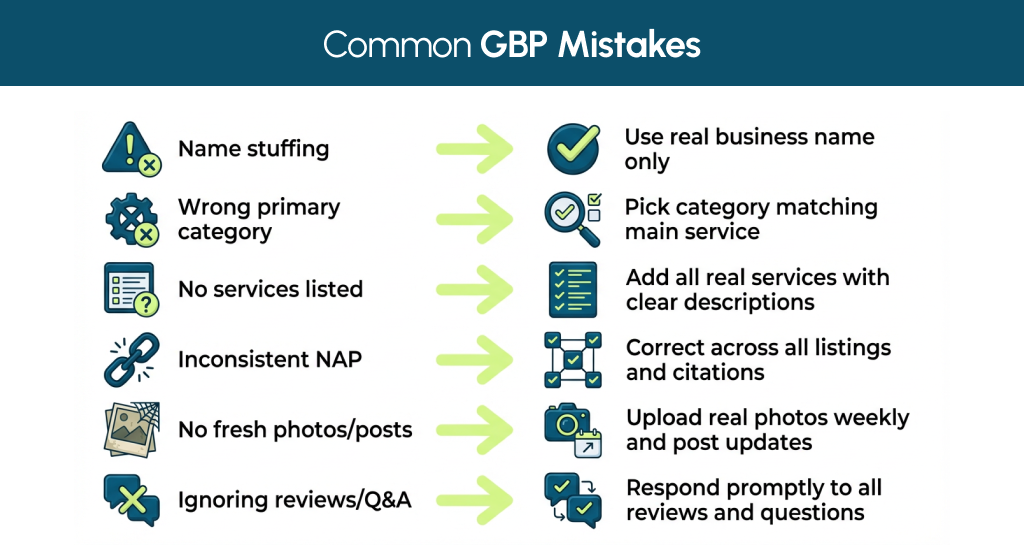
Name Stuffing
Adding extra keywords to your business name is risky. Google sees this as spam. Only use your real business name. Name stuffing can result in edits, flags, or even suspension risk. If you can follow the Google Business Profile Optimization Checklist, you can ensure safe naming.
Wrong Primary Category
If you choose the wrong primary category, it confuses Google. Also, it affects search matching and can hide your profile from relevant local searches. You should pick a category that represents your main service clearly. Secondary categories support additional services.
No Services Listed
Leaving services empty makes it hard for Google to understand what you offer. Services act as relevance signals. You should complete your service list with real offerings to help optimize your Google Business Profile and attract the correct searches.
Inconsistent NAP
Name, Address, and Phone (NAP) must match across all online platforms. Inconsistent NAP or STE in the address lowers trust and harms local SEO rankings on Google Maps. You should always check directories, social profiles, and citations for consistency.
No Fresh Photos/Posts
Inactive profiles with old or stock photos appear less trustworthy. Regular updates with real photos and a Google Posts strategy improve engagement. Also, this initiative really helps improve Google Business Profile visibility over time.
Ignoring Reviews/Q&A
Not responding to reviews or questions signals low engagement. Replying to positive, neutral, and negative feedback strengthens trust and boosts ranking. Proper review management for Google Business Profile is essential.
Examples of Well-Optimized Local Service Profiles (Plumbing, HVAC, Landscaping)
Now, let’s check out exactly what top-ranking profiles consistently include. They combine correct categories, complete services, engaging photos, active posts, and strong review strategies to boost local SEO Google Maps ranking.
Plumbing Business
- Category Choice: Primary category “Plumber” with secondary categories for drain cleaning and water heater services.
- Description: Clear 750-character description covering services, service areas, and trust signals like years of experience.
- Photos: Logo, cover, team, work, and exterior photos updated weekly.
- Services: List all main plumbing services aligned to categories. Short local phrases are included naturally.
- Review Strategy: Requests reviews ethically after jobs; responds to positive, neutral, and negative reviews promptly.
HVAC Business
- Category Choice: Primary category “HVAC Contractor,” secondary for air conditioning and heating repair.
- Description: Focused on service areas, seasonal services, and safety compliance. Natural keywords for local search are included.
- Photos: Work before/after, team, equipment, and shop exterior. Frequent updates to show activity.
- Services: Furnace repair, AC installation, maintenance packages; each clearly described for Google and users.
- Review Strategy: Monitors review velocity. Responds to all reviews with a friendly, human tone; highlights recurring clients.
Landscaping Business
- Category Choice: Primary “Landscaper,” secondary categories for lawn care, seasonal cleanup, and garden design.
- Description: Explains core services, neighborhoods served, and experience. Trust signals like certifications or repeat clients.
- Photos: Seasonal projects, team, property before/after shots, and work tools.
- Services: Lawn mowing, planting, mulch work, and design consulting. Concise descriptions with geo modifiers.
- Review Strategy: Requests reviews after each completed project. Responds to questions and feedback promptly; highlights visual results.
Tools & Resources for Managing GBP
Tools help scale reviews, citations, and posting, but they’re optional. They make management easier, save time, and help improve Google Business Profile visibility. Keep in mind, small businesses can succeed without them. What you need is a professional digital strategy that will tell you which tools you need to build a simple monthly routine without wasting budget.
- Review Management Tools: Platforms like Podium and Chatmeter help request, monitor, and respond to reviews efficiently. They track sentiment, review velocity, and trends to maintain high ratings.
- Citation & Listing Tools: Tools like BrightLocal and Whitespark manage business listings across directories. They can ensure NAP consistency, detect duplicates, and help improve local SEO Google Maps ranking.
- Posting & Content Tools: Some platforms let scheduling Google Posts strategy, multimedia updates, and service announcements. This content management keeps profiles active and improves engagement metrics.
- Rank Tracking Tools: Track search performance for specific keywords or locations. Service click data shows which services attract the most clicks. This insight can help you refine how you optimize your Google Business Profile over time.
Who Needs Tools vs Who Doesn’t
Businesses with multiple locations, high review volume, or frequent updates benefit most from tools. They save time, maintain consistency, and provide valuable reporting.
Single-location or small businesses with fewer reviews can manage manually using the Google Business Profile dashboard. Consistency, proper review responses, and regular posts are more important than tools for these businesses.
Google Business Profile Optimization Checklist
You can use this checklist to confirm your GBP is fully optimized in under 30 minutes. Try to follow each bucket step to improve local SEO Google Maps ranking and overall profile visibility.
Setup / Verification
- Claim your business or create a new profile.
- Complete verification using a postcard, phone, email, or video.
- Access your business dashboard for edits.
Core Info + Categories
- You should ensure the business name matches the legal/real-world name.
- Add correct primary and secondary categories.
- Don’t forget to enter an accurate address, service areas, and hours.
- Try to add attributes like wheelchair access or on-site service.
Services / Products / Attributes
- List all services/products aligned with categories.
- You should use short, clear descriptions with local terms.
- Include optional pricing if stable and accurate.
- You should confirm all attributes reflect real offerings.
Photos / Videos
- Upload logo, cover, team, work, and exterior images.
- You should add short videos (15-30 sec) showing services or results.
- Update weekly or biweekly to maintain engagement.
Reviews
- Request reviews ethically after each job.
- You should respond to positive, neutral, and negative reviews.
- Flag fake or spam reviews following Google guidelines.
Posts
- Publish regular Google Posts about services, events, or updates.
- You should use simple language and local keywords.
- Try to maintain a consistent posting schedule.
Q&A / Messaging / Bookings
- You should answer questions promptly.
- Enable messaging and booking features if applicable.
- Try to keep the response tone friendly and helpful.
Citations / NAP
- Verify Name, Address, Phone (NAP) consistency across all directories.
- You should always check and remove duplicate listings.
- Try to update any changes promptly to maintain trust.
Insights Tracking
- Monitor calls, direction requests, website clicks, and photo views.
- Try to adjust strategy based on monthly performance trends.
- You should track which services or posts drive the most engagement.
This Google Business Profile Optimization Checklist can ensure every critical section is complete and active for maximum visibility.
Final Thoughts (Rank Higher + Get More Local Leads)
A fully optimized profile boosts visibility, calls, and leads for local service businesses. This Google Business Profile Optimization Guide shows every step to improve Maps ranking and attract nearby customers.
The next step is simple: audit your profile today. You should check core info, services, photos, reviews, and posts. Minor updates now can result in higher local rankings and more real leads.