What if your business shows up on Google even if you don’t have a website? Sounds strange? However, it’s possible! Many small shops, local services, and solo entrepreneurs wonder if they can use Google Business without a website. The short answer is yes.
You won’t get every online feature, but you can share your address, phone number, photos, and hours, even if you don’t have a website. With the right setup, you can rank on Google without a website and look professional online.
This blog explains exactly how to make your Google Business Profile work, step by step, without a website. So, keep reading to see how you can get noticed online.
Do I need a website for Google Business Profile?
The simple answer is no. You don’t need a website to make your business appear on Google. With a Google Business Profile, you can still show up on Google Search and Maps. People can see your business hours, photos, directions, and contact details.
Customers can call or message you directly, leave reviews, and even find ways to book services through Google partners. Your online presence doesn’t disappear just because you don’t have a standalone website.
With the right setup & and proper Local SEO optimization, you can rank on Google without a website and reach local customers fast. How it works without a website:
- Appear on Google Maps and Search: Your business can show up for local searches even without a traditional site.
- Receive calls and messages: Customers can connect with you directly through the profile.
- Share updates and photos: Post offers, pictures, and news to keep your profile active and attractive.
- Collect reviews: Reviews help improve visibility and trust without needing a website.
- Enable bookings via partners: Integrate with scheduling services or delivery platforms to let customers book or order online.
Setting up and optimizing your Google Business Profile properly can create a strong online presence. You just need to verify Google Business without a website and follow some simple steps to attract customers.
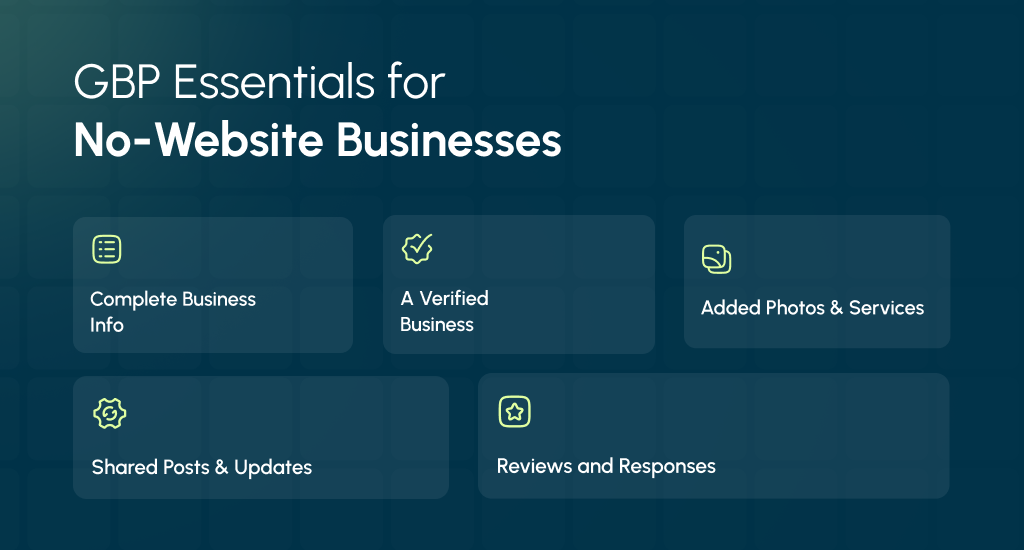
GBP Essentials You Must Complete (No Website Needed)
Even without a website, your Google Business Profile can attract customers. Completing key elements increases visibility, trust, and engagement. Here’s what to focus on to make your profile strong and complete.
Complete Core Info
Fill in your business name, address (or service area), hours, phone number, and short description. You should choose the right primary and secondary business categories to help Google match your business with local searches.
Accurate details can meet Google Business Profile requirements and build trust with customers.
Verification Options
You can verify Google Business without a website using postcard, phone, or video verification. Make sure your NAP (name, address, phone) is consistent. Clear signage and proof of operations improve your chances of passing the first attempt.
Photos, Products, Services & FAQs
Add photos, product highlights, service menus, and answers to FAQs. Proper visuals make your profile attractive and trustworthy, and ensure your photos meet Google’s requirements to avoid rejection. Completing this section meets Google Business Profile requirements and helps verify Google Business without a website.
Posts and Updates
You should share news, offers, or events through Google Posts. Regular updates signal activity, increase engagement, and encourage customers to interact with your business online.
Reviews and Ratings
Try to encourage reviews from real customers using proven strategies to get more Google reviews. You should respond politely to feedback. Positive ratings improve visibility and help your business rank on Google without a website.
Using Google’s Free GBP Website (business.site)
Google offers a free GBP Website/business site that anyone with a Google Business Profile can activate. It automatically pulls information from your profile, like address, hours, phone number, photos, and reviews.
You don’t need a separate website to create it, and it works well as a simple and mobile-responsive landing page.
How to Turn It On
- Sign in to your Google Business Profile.
- Click on “Website” in the dashboard.
- Choose a template and customize basic colors and photos.
- Publish your site using the free business site domain.
Limitations
- Templates are basic, with limited design options.
- No built-in blog or e-commerce support.
- You cannot fully control SEO like a standalone site.
When It’s Enough
For small shops, local services, or solo businesses, this free site often covers the essentials: contact info, directions, and a simple online presence. A great alternative for online presence.
Mapping a Custom Domain Later
If you grow your business, you can connect a custom domain to the business. site website. It makes your profile look more professional while keeping your existing GBP content intact.
A Google Business Profile website can serve as a fast and free way to start online. Also, it can totally support your Google visibility without a costly traditional site.
Who Really Benefits from Google Business Without a Website
Not every business needs a full website to attract customers. Some can do well with only a Google Business Profile, while others need a proper site for growth. Let’s see where your business fits.
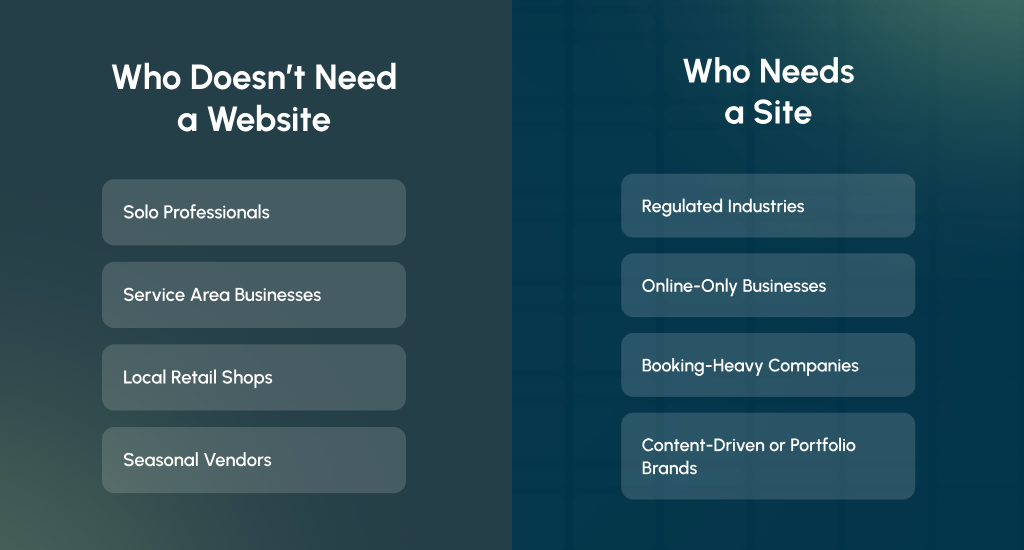
Who Can Succeed Without a Website?
Many small and local businesses can do fine without a site. Their customers usually want quick information like directions, contact details, or reviews.
Solo Professionals
Freelancers or one-person services like electricians or tutors can use a Google Profile to get calls and messages. It gives them visibility without paying for a full website.
Service Area Businesses (SABs)
Plumbers, cleaners, or handymen work in specific neighborhoods. A strong service area setup, reviews, and photos are often enough to build trust and attract real nearby clients.
Local Retail Shops
Small stores that depend on walk-in customers can focus on directions, contact numbers, and product photos. A good online presence here means appearing on Maps when people search nearby.
Seasonal Vendors
Food stalls or event booths may only operate part of the year. A free Google Profile helps them appear active during business months without the cost of maintaining a site.
These examples show that yes, you can absolutely have Google My Business without a website.
When You Will Need a Site for Your GBP
Some businesses depend heavily on online systems or must meet strict industry rules. For them, a proper site is not optional.
Regulated Industries
Medical, legal, or financial services often require a website for compliance. It proves legitimacy and lets them share legal notices, forms, and certifications.
Online-Only Businesses
If you sell products or run digital services, a site is needed to process orders safely. Google Profiles cannot handle payments or customer accounts.
Booking-Heavy Companies
Hotels, spas, or training centers need booking systems. A custom landing page helps track leads and improve conversions for Local SEO or Google Ads.
Content-Driven or Portfolio Brands
Designers, photographers, and consultants often rely on showing work samples. A full site gives them space to build trust and attract long-term clients.
Smart Ways to Get Found on Google Without a Website
Even without a site, you can still attract local customers. A complete and active Google Business Profile can do the work of basic SEO if you use it wisely.
Categories, Services & Keywords in Plain English
You should pick the most accurate business category that truly represents your work. Add services one by one and describe them in simple words that people actually search for.
Try to avoid fancy terms. For example, write “home cleaning” instead of “residential sanitation.” Google uses this information to match your profile with local searches.
Reviews & Responses
Reviews are one of the strongest ranking signals. Share your review link or display a QR code in your shop so customers can leave feedback easily. Always reply; even a short “thank you” works.
Reviews build trust, improve your online presence, and help your business rank on Google without a website. Learn why Google reviews sometimes disappear and how to prevent it.
Photos, Posts & Offers
Add new photos every week or month. You can share posts about sales, new products, or seasonal events. Active profiles get more clicks because they look real and reliable. Google rewards this freshness with better visibility in Google Search and Maps.
Enable Bookings / Messaging
You should turn on customer messages so people can contact you directly. If your business accepts appointments, link a booking partner approved by Google. Fast replies help you appear higher on Google Maps results.
Accurate Business Info
Make sure your business hours, phone number, and address are correct across all platforms. Consistent data tells Google your business is real and active, which helps maintain higher visibility.
Extra Tip: Keep It Active
Don’t leave your profile untouched for months. You should add updates, reply to questions, and upload photos regularly. Even small actions remind Google that your business is open and trusted.
What Should a Customer Without a Website Do?
You might wonder what happens after people find you on Google. Without a site, how do they reach you? Don’t worry, your Google Business Profile already gives visitors several ways to connect directly.
Use Built-In Google Actions
Your profile includes simple buttons like Call, Directions, Message, and Book. These tools turn your profile into a small hub for customer actions. People can call you right away, find directions through Maps, or message you with quick questions. Businesses that respond fast often show up more in local results.
Send Traffic to Trusted Profiles
If you don’t have a personal website yet, you should link to your third-party websites where customers can learn more about you. For example:
- A Facebook or Instagram page with your latest updates.
- A TripAdvisor or Yelp listing with reviews.
- A scheduling app or booking page if you take appointments.
These links work like mini landing pages, giving people enough details to make contact or take the next step.
Why It Works
Google values action more than fancy design. If customers click, call, or visit you, your Google Business without a website can still perform well. The goal is to make it easy for people to reach you and trust your business.
Can You Run Google Ads Without a Website?
Yes, you can run ads without a website, but with some limits. Google now offers special ad types for small businesses that don’t own a traditional site. These ads can still bring you real leads if set up the right way.
Local Services Ads
Local Services Ads are made for home services like plumbers, cleaners, or electricians. You don’t need a website at all. Instead, Google shows your business at the top of local searches with a “Google Guaranteed” badge.
People can call or message you straight from the ad. It’s simple, safe, and great for building trust through Local SEO visibility.
Performance Max for Local Goals
If you already have a Google Business Profile, you can use Performance Max campaigns that rely on your profile instead of a landing page. These ads show across Maps, YouTube, and Search.
However, tracking results and measuring traffic is harder because you don’t have a dedicated site to collect data.
What to Expect
Running ads this way works best for quick actions like calls or store visits, not for detailed conversions.
You’ll still need clear contact details, strong reviews, and accurate business info. Eventually, a small landing page helps improve ad quality and performance, but it’s not required to start.
The Real Limits of Running Your Business Without a Website
Having only a Google Business Profile works for beginners, but it’s not a complete solution. It helps your online presence, yet limits how much you can control, track, and grow your brand in the long run.
Limited Content Control
With a website, you decide how everything looks like the layout, colors, and content flow. On Google, your profile follows their structure. You can’t freely design sections, reorder information, or display extra pages like FAQs or testimonials.
Weaker Brand Storytelling
Your profile permits short text and photos, but it can’t express your full story or brand message. A website gives you space to show your style, values, and personality. Overall, it can create a stronger emotional connection with visitors.
Fewer Analytics
Google gives basic insights like how many people called or viewed your profile. But it doesn’t show how users found you, what they clicked, or how long they stayed. It limits what you can learn about real customer behavior.
Tough for Content Marketing
Without a website, you can’t write blogs, share articles, or create SEO content. That means fewer chances to rank for new keywords, build backlinks, or attract steady organic traffic through comprehensive SEO services that grow over time.
Dependent on Google’s Interface
Your business depends on Google’s design choices. Any new layout or mobile-responsive update can change how your profile appears overnight. You have no control over these updates, even if they affect your customer reach.
Future Migration Path
As your business grows, you should consider building a small site under your own domain hosting. Start with one or two pages. It really gives you freedom, better tracking, and a stable base for long-term marketing.
How to Grow From No Website to a Full Online Presence
Starting without a website is fine. Many local businesses begin that way. But as you grow, your online setup should also grow. Here’s a simple four-stage roadmap to guide your progress step by step.
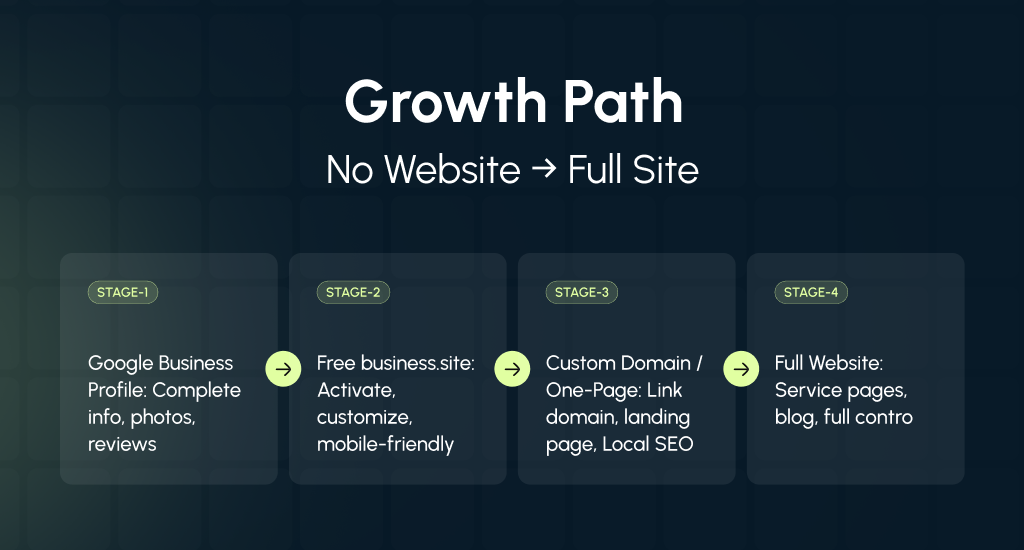
Stage 1: Google Business Profile Only
At first, you should focus on your Google Business Profile. Keep your information correct, upload photos, and collect reviews. It builds trust and visibility on Search and Maps. You can appear locally without spending anything.
Stage 2: Turn on the Free business.site
Next, you should enable Google’s free GBP Website (also called the Google Business Profile website feature). It creates a small website using your profile data. You can customize colors, photos, and short text. It gives you a mobile-friendly landing page with basic contact info.
Stage 3: Add a Custom Domain or One-Page Site
Once your business grows, you can map a simple custom domain like “yourbrand.com.” You can link it to your business site or build a single landing page. That looks professional and helps with brand recognition and Local SEO.
Stage 4: Expand to a Full Website
When you’re ready, you can move to a full website with detailed service pages, an FAQ, a blog, and contact forms through professional web design and development services. Try to add schema markup for better Google understanding. It gives you full control, stronger SEO, and space for long-term growth. Remember to include regular website maintenance and security as part of your long-term strategy.
Why This Path Works
Each step adds more power and independence. You start small, learn the basics, and upgrade when ready. This balanced approach lets your online presence grow naturally, without wasting valuable money or losing real visibility.
How to Track Your Results Without Google Analytics
You don’t need Google Analytics to know if your business is doing well online. Even without a website, you can still measure your reach and customer actions through simple tools inside your Google Business Profile.
Use GBP Insights
The built-in “Insights” section shows how people find you on Google Search and Maps. You can see:
- How many viewed your profile or photos?
- How many people called your business directly?
- How many requested directions or clicked for more info?
These numbers give you a clear idea of what’s working and what needs improvement.
Track Calls the Smart Way
You can use call tracking numbers to see how many people contact you from your profile. Just keep your NAP (name, address, phone) consistent.
Add the tracking number as an “additional phone” while keeping your main number as the primary one. This way, your online presence stays trustworthy, and you can still gather accurate call data.
Add UTM Tags to Your Business. site Link
If you’re using a business site or any other link in your profile, you should add UTM tags to it. These small tags help you track visits through Google’s tools or other analytics platforms. You’ll know how many people clicked your link from search results.
Why Tracking Matters
Without tracking, you can’t tell what’s working. Insights, call tracking, and UTM tags together show real actions like calls, visits, and searches. They can really help you understand your visibility in Search results and on Maps.
End Note
Even without a website, your business can still be visible, trusted, and easy to contact. A well-completed Google Business Profile, fresh photos, reviews, and accurate info help you reach local customers effectively.
As your business grows, you can gradually add a business site or a full website to expand control and SEO opportunities. Start small, stay active, and use the tools Google provides. With consistent effort, you can build a strong online presence and attract more real customers.