A blog without clear categories feels like a map with no labels. Readers get lost, and search engines struggle to place your content. So, how many categories should I have on my blog? This simple step significantly impacts both user experience and SEO.
In one sentence, the answer is 5 to 10 categories for a mature blog. If your site is new, stick with 1 to 3 categories until you have more content. This category count keeps the blog tidy and easy to follow.
In this guide, you’ll learn how to categorize blog posts, how to name categories, see real blog category examples, use templates, run an audit, and check all necessary information about categories to stay organized.
How Many Categories Should I Have on My Blog?
Deciding the correct number of categories for your blog can feel tricky, but it doesn’t have to be. The best number depends on your blog type and how much content you plan to publish.
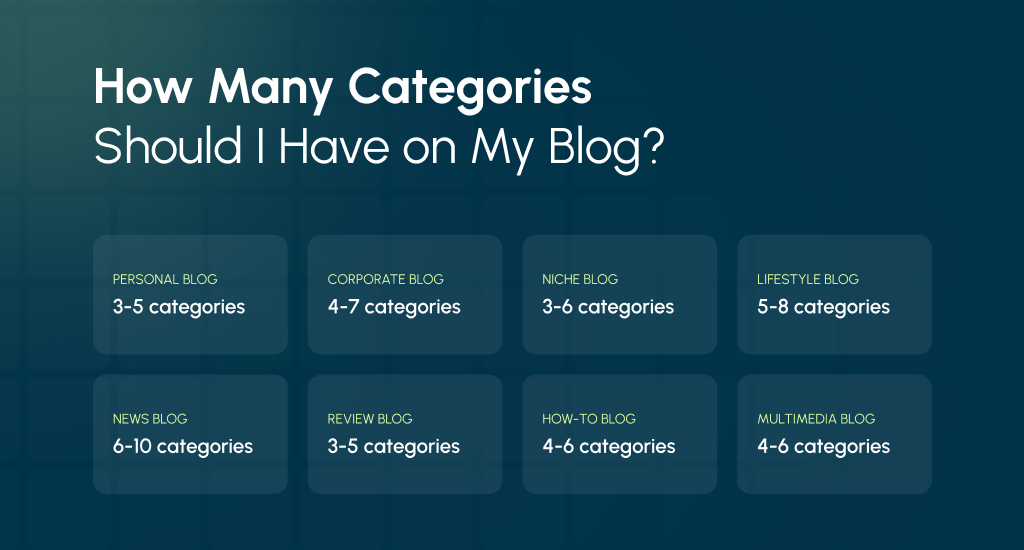
Below, you’ll see clear examples of different kinds of blogs:
Get a hands-on audit of content categories, blog structure, IA, and naming to keep your blog organized as it scales.
Personal Blog
A personal blog works best with 3-5 categories. These should cover the main parts of your life, such as Travel, Food, or Life Lessons. Too many categories will make your blog look cluttered and may confuse your readers rather than guide them.
Business / Corporate Blog
A business or corporate blog often needs 4-7 categories. Each category can reflect your services, products, or industry knowledge. For example, Tips, Case Studies, News, and How-Tos. This approach helps readers find what matters most to their business needs.
Clear category hierarchy improves crawl paths and topical authority; our Organic SEO programs can build and interlink those pillars for your business.
Niche Blog
A niche blog should stay within 3-6 categories. Since the subject is focused, categories can highlight subtopics. A fitness blog might use Workouts, Nutrition, and Mindset. This strategy keeps the blog narrow but still rich with organized information.
Lifestyle Blog
Lifestyle blogs often need 5-8 categories, as they cover many parts of daily life. Categories like Fashion, Food, Travel, Home, and Wellness help readers move around easily. Without them, a lifestyle blog can quickly feel scattered and hard to follow.
News Blog
News blogs require 6-10 categories because they cover many areas of interest. Common sections include Politics, Tech, Sports, Entertainment, Business, and Health. This wider spread of categories allows readers to head straight to the kind of news they care about.
Affiliate / Review Blog
An affiliate or review blog should usually stick to 3-5 categories. Categories often match product groups, such as Electronics, Software, or Home Gadgets. This approach makes the site clear, so visitors instantly know where to look for a specific review.
Educational / How-To Blog
For an educational blog, 4-6 categories are ideal. Think of categories like Tutorials, Guides, Tools, or Case Studies. This structure helps learners follow a smooth path without jumping randomly between topics, which improves both clarity and learning experience.
Podcast / Multimedia Blog
A podcast or multimedia blog works well with 4-6 categories. These can group content by format and theme, such as Episodes, Interviews, Tips, Reviews, and Transcripts. This method supports different content styles while keeping the site easy to browse.
Why 5-10 Blog Categories Work Best
Finding the right number of blog categories is about balance. Too few makes your site look empty, while too many makes it messy. Most bloggers discover that sticking to 5-10 categories gives both readers and search engines the best experience.
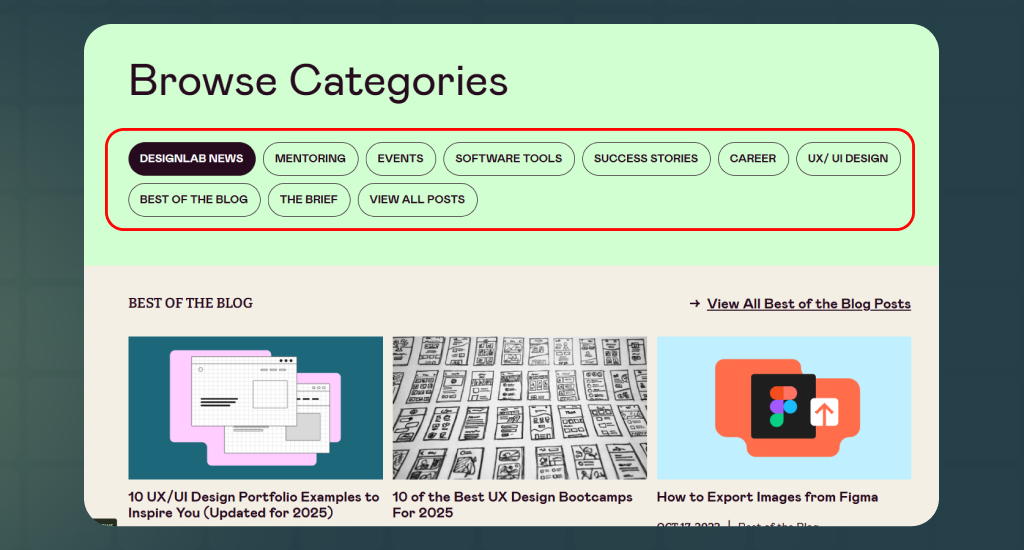
Blog Navigation Improves When Readers Have Fewer Choices
When you give too many labels, readers freeze and leave. Psychology calls this the “paradox of choice”. Our research team’s findings and CMSMinds report show that 34.6% of visitors prefer simple structures. With 5-10 categories, people find what they want without stress.
If that seems hard for you, you can always rely on us. We design category page UX navigation that reduces choice overload and speeds readers to the right content.
Blog Content Stays Organized Through Clear Pillars
Categories act like pillars. They are broad enough to hold many posts but still focused. For example, a food blog with 6 categories (Recipes, Nutrition Tips, Kitchen Tools, Restaurant Reviews, Meal Planning, Seasonal Foods) has space to expand without confusion.
Blog SEO Benefits from a Clear Category Hierarchy
Search engines explore blogs with crawlers. With a clear structure, crawlers see how topics connect. If category pages are well-written, not just empty lists, they can even rank. According to HubSpot research, businesses with blogs get 55% more website visitors.
Blog Editorial Planning Becomes Easier with 5-10 Categories
Having a manageable set of categories lets you plan content across the year. For instance, a fitness blog can rotate posts: Workouts in January, Nutrition in February, Mindset in March. This rhythm avoids gaps and keeps variety alive.
Example: A Tech Review Blog with 6 Categories
A blog that reviews gadgets may use: Smartphones, Laptops, Cameras, Accessories, Software, and Tutorials. A phone launch review goes under Smartphones. A laptop how-to fits in Tutorials. Readers quickly know where to look.
Example: A Travel and Food Blog with 6 Categories
A blog with: Travel Destinations, Local Food, Budget Tips, Travel Gear, Culture Stories, and Photo Essays. A Bangkok street food guide fits in Local Food. A gear checklist goes into Travel Gear. Each post has a home.
How Many Categories to Start a New Website With
If you’re launching a new website, the best number of categories is 1-3 core topics. This small range keeps your blog neat and easy to grow without looking empty at the start.
When you add too many categories early on, most of them will have only one or two posts. That creates “thin” category pages, which look weak to both readers and search engines. A focused structure is much stronger.
Starting small also helps you build topical authority. If you keep writing posts under a narrow set of categories, your blog quickly becomes a trusted resource in those areas. Later, you can add more categories as your content grows.
For example, a solo blogger in a narrow niche might start with just 1-2 categories. A hobby blogger covering more than one interest can safely start with 2-3 categories. Both setups work, as long as the focus stays clear.
Rules Before Creating a Blog Category for A Website
Before adding a new category to your blog, ensure it serves a clear purpose. Creating unnecessary categories can confuse readers and complicate your site’s structure. Follow these practical guidelines to maintain an organized and user-friendly blog.
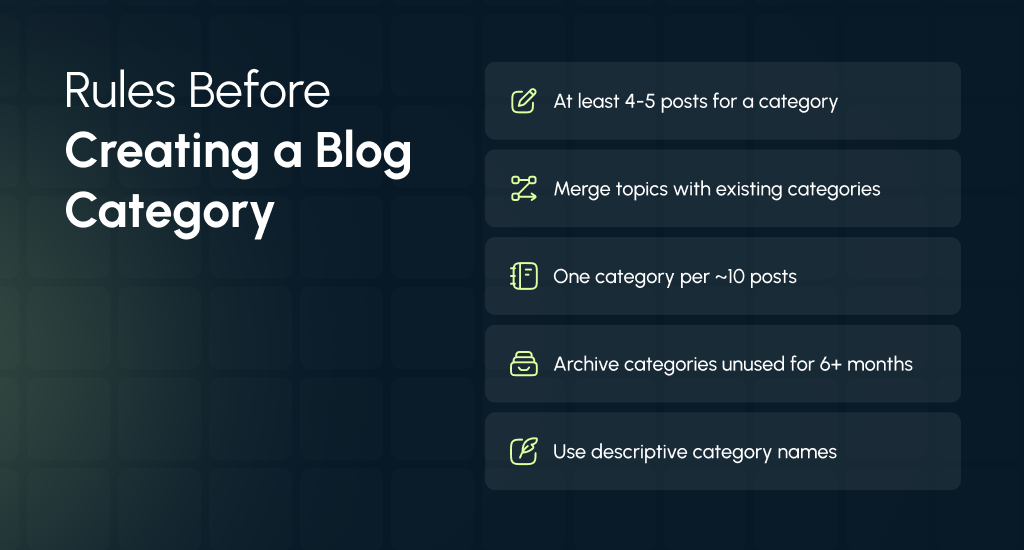
Keep it small
- Have at least 4-5 posts or drafts that clearly belong to the new category: Ensure there’s enough content to justify a new category. If you don’t have several related posts, it’s better to wait until you do.
- Prefer consolidation over new categories if overlap exists: If topics overlap, consider merging them into existing categories to keep your blog streamlined.
- Use the 1:10 ratio as a guideline: For every 10 posts, aim for one category. This helps maintain balance and prevents category overload.
- If a category remains unused for 6+ months, archive or delete it: Inactive categories can clutter your site. Archive or remove them and update any links accordingly.
- Ensure category names are clear and descriptive: Choose names that accurately reflect the content within. Avoid vague or overly creative titles.
- The number of categories should be small to maintain clarity: Too many categories can overwhelm readers. Aim for a manageable number to keep navigation simple.
How to Choose and Name Categories for A Blog Website
Choosing and naming categories correctly is important for both readers and search engines. The right categories make your blog easier to navigate and help visitors find the content they want. Below are clear steps to pick and name categories effectively.
Choose Based on Reader Needs and Search Intent
Think about the main topics your readers expect on your blog. Categories should reflect their interests and questions. If you have analytics, check which topics get the most attention.
For example, if many visitors read posts about “Quick Breakfasts,” it makes sense to create a category around that topic. Focus on what your audience truly wants, not just what you like to write.
Naming Best Practices
Keep category names short, clear, and easy to read. Use natural language, for example, “Breakfast” instead of “Morning Meal Ideas for Busy People.” Avoid stuffing keywords or using complicated phrases. Choose singular or plural consistently across the site, so the menu looks tidy. Clear names help both readers and search engines understand your content.
Avoid Micro-Categories
Do not create a category if it will only ever hold 1-2 posts. Instead, use tags for very specific topics. Micro-categories can clutter your site and confuse visitors, while tags allow you to still group related content without making extra menus.
Base Categories on Content Volume
Only create a category if you can envision at least 4-5 posts under it within the next 6 months. This strategic approach ensures category pages stay useful and never feel empty or thin.
Keep the Menu Readable
Too many categories in navigation make the menus crowded. Stick to core topics that are easy to scan. You want visitors to understand your structure at a glance.
Category Pages Must Add Value
Category pages should not be simple lists of posts. Add short summaries or featured content to make them useful for readers and improve SEO.
Short Blog Category Checklist
- Do categories reflect core reader problems?
- Can I create ≥4 posts per category in 6 months?
- Are names clear and concise?
- Will the menu stay readable?
- Will category pages be usable and valuable?
- Do categories align with overall site goals?
- Are categories easy to expand as content grows?
Category Pages: Make Them Useful (SEO + UX)
Category pages are not just archives; they guide readers and improve search visibility. A well-structured page helps visitors find content quickly and signals authority to search engines.
SEO: Optimize Category Pages for Search
A strong category page can rank if it adds value beyond a simple post list. Use these techniques:
Map Categories to Pillar Pages
Each category should support a main pillar post or guide that covers the topic in depth. Related posts should link back to the pillar, using clear anchor text. This builds a topical map to help search engines understand your site and show readers the full scope of a topic.
URL Structure & Technical Tips
Use clear category slugs in URLs, so users and search engines understand the page topic. Like: /recipes/chicken-dinners/quick-chicken-pasta.
Include breadcrumbs for easy navigation and canonical tags to avoid duplicate content. Plan URLs from the start to minimize redirects when reorganizing content later.
If your website’s URLs are feeling like a mess, then you can reach out to us. We can restructure your categories, plan URL changes, and 301s to preserve rankings and avoid broken links.
Analytics & Iteration
Monitor sessions, bounce rate, and time on page for each category. Identify which categories attract readers and which don’t. When a category shows traction, improve existing posts instead of creating too many new ones. This approach ensures your strongest topics continue to grow.
UX: Make Category Pages Easy to Use
The blog category page design should help visitors navigate your content smoothly. Simple improvements boost engagement and keep users on your site longer.
Menu & Navigation
Place primary categories in the main menu, but limit the number to keep it clean. Use dropdowns or grouped menus (e.g., Topics → Food, Travel, Tools) to organize multiple subcategories. For sites with many categories, a top-level “Topics” hub page works well to centralize content.
Featured & Curated Content
Showcase a pillar post prominently and add a curated list of top posts with short excerpts or bullet points. Include internal links to related categories and tags. Add a call-to-action, such as a newsletter signup, resource download, or guide, to encourage further engagement.
Breadcrumbs & Search
Display breadcrumbs so readers always know their location on your site. Include a search box for quick discovery. Clear H1 headings and meta titles help users and search engines understand the page topic immediately.
Audit & Fixing Old Categories on A Blog Website
Over time, blog categories can become messy, overlapping, or thin. Regular audits help tidy your site, improve user experience, and support SEO. Here’s a practical step-by-step process to clean up old categories efficiently:
Step 1: Export Data
Start by creating a CSV or spreadsheet with your category information. Include columns such as: Category name | Slug | Post count | Representative posts | Description | Recommended action | Notes. This strategy gives you a clear overview of your blog structure and helps identify problem areas quickly.
Step 2: Identify Thin Categories
Check for categories with fewer than four posts. These often look empty to readers and search engines. Flag them for merging into a related category or archiving if the content is outdated or irrelevant.
Step 3: Find Overlaps
Look for categories that cover very similar topics. Merge overlapping categories, update the category page, and implement 301 redirects from old slugs to the new consolidated category to maintain SEO value.
Step 4: Update Category Pages
For categories you keep, write a short 1-2 line intro that explains the topic. Highlight featured posts and include a curated list of relevant articles. It will help you make category pages more useful to readers and improve search rankings.
Step 5: Implement Redirects
Ensure any merged or deleted category URLs are 301 redirected to the new or parent category. This method helps you avoid broken links and preserves traffic.
Step 6: Tag Cleanup
Normalize tags, remove near-duplicates, and consider setting noindex on low-value tag pages. This strategy will help you keep your taxonomy clean and avoid keyword cannibalization.
Step 7: Re-check Analytics
After making changes, monitor traffic, bounce rate, and engagement. Adjust categories further if needed to maximize visibility and user experience.
Common Mistakes to Avoid While Making Categories
Creating blog categories may seem simple, but small mistakes can hurt both readers and SEO. Many bloggers make errors that reduce navigation clarity or dilute search authority. Avoid these pitfalls to keep your blog organized and effective:
Creating Categories with Only 1-2 Posts
Categories that contain just one or two posts are called thin archives. They look empty to visitors and search engines. Such categories rarely rank in search results and make your site appear poorly structured.
Having Too Many Categories
Using 20 or more categories overwhelms readers and makes menus confusing. Too many options can cause decision fatigue, reducing engagement. A smaller and well-organized set of categories keeps the site readable and easy to explore.
Using Categories and Tags Interchangeably
Categories and tags serve different purposes. Categories organize broad topics, while tags describe specific details. Mixing them up creates confusion, duplicates content, and may dilute SEO value across your site.
Leaving Category Pages Empty or Missing Metadata
Empty category pages with no intro, featured posts, or meta title/description fail to engage visitors. They also limit search engine visibility. Always add content summaries, featured posts, and SEO-friendly meta information to every category page.
Reorganizing URLs Without Proper Redirects
Changing category URLs without implementing 301 redirects causes broken links, lost traffic, and a poor user experience. Always plan URL changes carefully and redirect old slugs to the new or parent category to preserve SEO authority.
End Note
Blog categories are not just labels; they shape how readers explore your site and how search engines rank your content. If you still wonder how many categories should I have on my blog, remember the sweet spot: 5 – 10 for established sites and 1 – 3 for new ones.
Keep them clear, simple, and useful. With the right structure, your blog feels easier to manage, more professional, and far more inviting for visitors who want to return again and again.